Turning CELx confusion into confidence at IBM
How I helped cybersecurity admins write complex identity expressions easier, faster and safer with and without generative AI.


1
Meet Scott
Scott works in Cybersecurity for a large retail company. He is the Access Management administrator and is responsible for the day-to-day tasks that keep the company’s infrastructure and apps secure, compliant, running and useful to others.
Most of his day is spent using IBM Verify.
But Scott has a difficult task: he often needs to write CELx to create custom identity attributes, which is like trying to communicate in a country where nobody speaks your language and the only dictionary you can find is incomplete. For Scott and everyone on his team, CELx scripting is really hard.


Scott managing identity access in IBM Verify

CELx is a hard concept for people to grasp. It isn't your normal programming language. Starting from scratch can take me three days, and I'd be banging my head against the wall.
2
The genAI team arrives
This project began with a request from the sales team to add generative AI to Verify.
After all, everyone else was adding AI to their products, so of course we needed it too. How hard could it be?
At first, everyone assumed that using AI to create difficult code would obviously be useful. However, as the project continued, we realised that the opportunities and the challenges were larger than we expected.

Our process

Our team’s end-to end process

How I felt working on this project :D
My role on the team:
-
Designed the end‑to‑end user experience, from early concepts to refined prototypes.
-
Brainstormed and developed conceptual ideas to support and guide user research.
-
Created low‑ and high‑fidelity prototypes for testing, reviews, and stakeholder alignment.
-
Recorded design demos and walkthroughs to share with stakeholders, quality teams, and designers across the department.
-
Collaborated closely with developers, engineers, project managers, and the broader cross‑functional team to ensure feasibility and clarity.
-
Defined research goals, conducted usability testing interviews, captured notes, observed key behaviours, contributed questions, and synthesised insights.
-
Worked with the design team to divide tasks, review each other’s work, and maintain consistency across the entire experience.
Our “hills” or goals
In this project we followed the IBM Enterprise Design Thinking approach, which uses hills.
Hills are short statements that describe what users should be able to achieve. They give clear direction without saying how to solve the problem, helping the team stay focused on real user needs and value.

Hill 1: CELx generation
Automate code generation to reduce manual effort, allowing users to focus on higher-value tasks.
Hill 2: CELx explanation
Empower users to easily understand code rules and simplify its complexity.
Hill 3: CELx debug
Create a seamless code debugging experience, enabling users to quickly identify and resolve errors, and allay frustration.
3
The Scott persona shows that CELx is hard to learn because it is unique to IBM, with limited documentation and few clear examples. Users often depend on old snippets from past projects, colleagues or online forums, and even small mistakes can break authentication flows or create security risks. They usually know what they want to achieve but struggle to write it in CELx, so the process becomes slow and frustrating.
THE PROBLEM BEHIND THE SCENES

How Scott feels having to write CELx

Poor documentation
IBM's CELx documentation lacks code examples, making it difficult for users to understand and implement.

Steep learning curve
IBM's custom wrapper around CELx makes it a unique language to learn. As such, users are not familiar with it and struggle to learn it.

Too many workarounds
Users often end up searching for snippets from previous work to write their code, or asking colleagues and forums for help.
Scott’s pain points
I struggle with the complexity of the language and figuring out the right expressions to use. I need something that can help me generate CELx expressions, so I can understand and implement things more easily and with more confidence.
As-is scenario
We needed to bring all stakeholders to an agreement on the approach we wanted to take. To do this, we held a playback alignment meeting, where we shared the user pain points and walked through the current as‑is scenario.
The storyboard below describes situations that Scott and his colleagues often experience, and it was created to illustrate the as‑is experience.

As-is scenario: these sticky notes were drawn for a playback alignment meeting with stakeholders
4
The investigation begins
At the beginning, we knew nothing about CELx and how it was used in Verify.
So we started by learning everything we could like reading documentation, and interviewing Verify users to understand their workflow and commons struggles.
We spoke with two IBMers who regularly work with CELx and with one business partner. All three independently shared their frustrations with the language and its documentation. This feedback was not prompted.
These initial discussions took place in person during the TechXchange event. They were not fully structured, as the researchers aimed to create a relaxed environment that felt more like a conversation than a formal interview.
Although the number of participants was small, the insights were useful. They helped us confirm some of the assumptions in our brief, and our intention was to continue gathering additional validation afterwards.

Interviews and workshops on TechXchange

Tools chosen for the competitve analysis
We also reviewed several coding assistants and completed a competitive analysis of GitHub Copilot, Tabnine, Cursor, and Amazon Q. We focused on three core capabilities that were most relevant to our work: generating code, identifying and fixing issues, and explaining how specific parts of the code operate.
To conduct this analysis, we carried out hands‑on testing with each tool, using the same set of tasks to observe how consistently and accurately they responded. In addition, I reviewed documentation, user guides, and publicly available examples to get a clear view of strengths, limitations, and common use cases.
This research helped us understand the latest AI patterns in code assist tools and shaped the behaviour and tone we wanted for our own solution. The goal was not to copy what already exists, but to learn where AI support is genuinely useful and where it can unintentionally make users feel unsure or less confident. It also gave me a clearer view of what users expect from coding assistants today and where we have real opportunities to offer more value.
5
Early design chaos
With the as-is scenario defined, the competitive analysis completed, and a clear understanding of the problem, we conducted a workshop to brainstorm some ideas.
We moved on to sketching low-fidelity ideas. We focused on exploring one of the possible entry points for CELx to start designing the early concept.There are several entry points for CELx in Verify, but they all lead into just two user interfaces.


Screenshot of the whiteboard from our brainstorm workshop

The two “before” interfaces for CELx
We chose to use the first interface as the base for my design.
The Figma board: screenshot of some of the low-fidelity iterations

Initial concepts
The team selected four main concepts to be tested in the next stage of research.
The goals of this new research were:
-
Validate the value and viability of the early feature ideas for generative AI CEL code assistance in Verify
-
Compare multiple, competing solution concepts
-
(Secondary) Gather further validation of current pain points and attitudes toward using CEL in Verify
To do this, we carried out semi‑structured interviews with five participants in the space of a week.
5
participants
4 IBM subject matter experts and 1 customer
6
WHAT WE LEARNED
Here’s what we learned in the interviews:
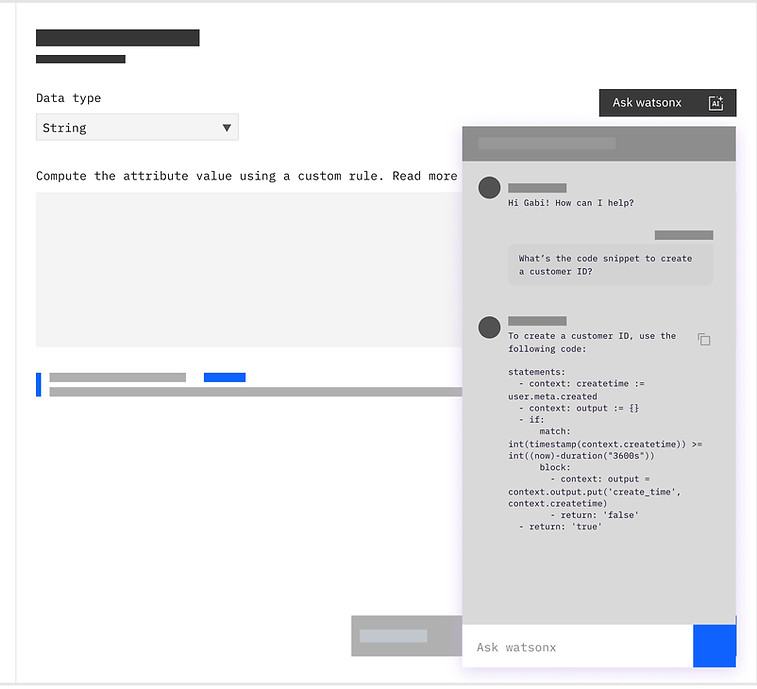
Chat panel
This concept used a default chatbot on the screen, which is the most common pattern today. But participants said they wanted a code assistant that feels more focused on their coding tasks, without pulling their attention away from the editor. They felt the standard watsonx chatbot side panel was too generic and a bit distracting.
Feels disjointed...like [you’re] just slapping an AI chatbot across the place.
— Participant 3

Split screen chat
Most participants preferred the Split Screen concept. They felt it was the strongest option for users who are not yet confident with CEL, because it gives more space for prompting and gen AI support without covering or distracting from the code editor.
The split screen chat was my favorite. It gave the flexibility of having my window and not being distracted by an AI chat bot while also having it when I need it.
— Participant 4
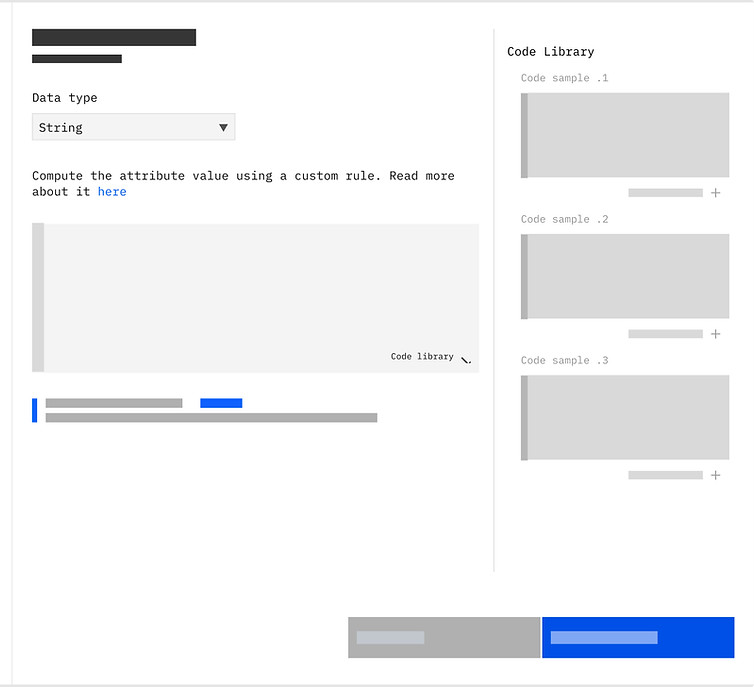
Code library
This concept focused on a Code Library, which does not include any gen AI features. All participants were immediately interested in it. They liked the idea of having a central place to store and reuse CEL code snippets, since they currently rely on their own workarounds.
Personally it’s helpful because costumers always ask for templates. No need to go to documentation or GitHub. It’s all stored in one place…
— Participant 2
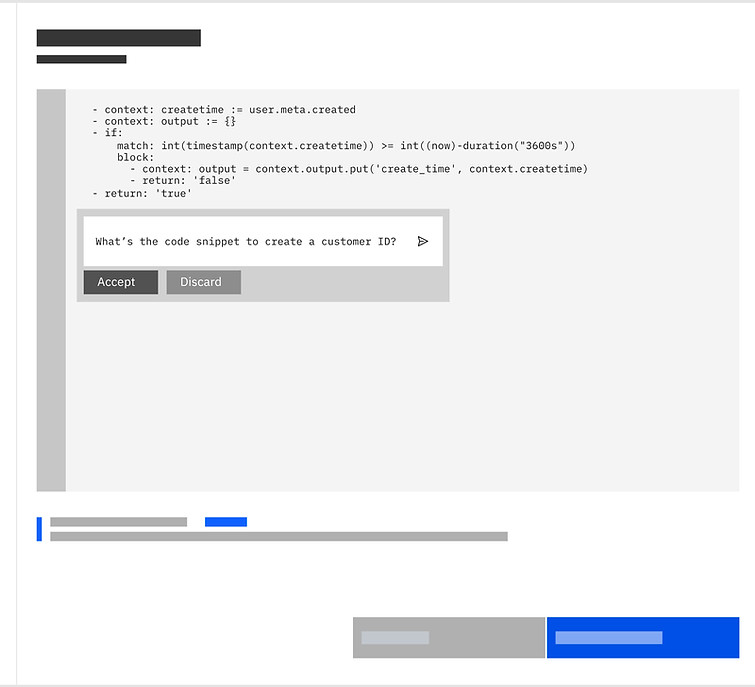
Inline prompt
This concept used a default chatbot on the screen, which is the most common pattern today. But participants said they wanted a code assistant that feels more focused on their coding tasks, without pulling their attention away from the editor. They felt the standard watsonx chatbot side panel was too generic and a bit distracting.
My type of Verify users knows a good deal... this helps me out without interrupting my flow.
— Participant 3
Participants agreed that gen AI CEL code assistance would offer strong value, especially for learning and saving time. They preferred embedded gen AI designs like split‑screen and inline prompts, because these made prompting easier, improved discoverability, and helped them stay focused in the editor. Although it centred on gen AI, many participants were immediately interested in the Code Library, since they lack a central place to store or reuse CELx snippets. Some also noted that step‑level code checking is helpful, but what they really need is an easier way to test an entire flow from end to end.
This confirmed that the solution needed to feel practical, respectful of experts' time, and flexible enough for both quick actions and deeper support.
7
DEFINING THE EXPERIENCE
Based on the concept test learnings, we decided to explore a direction that combined the strongest parts of the early concepts:

Split‑screen panel
Gives space for code and AI to sit side‑by‑side, without blocking the main task.

Inline prompt
Ideal for quick actions when a full chat experience isn't necessary.

CELx library
Quick access to examples from IBM documentation, and snippets they could save and reuse as they worked.
This combination supports both beginners and experienced developers, and keeps the workflow smooth and predictable.

The three key components of our solution
The next step was to design the high‑fidelity experience based on the decisions we made. After a few rounds of iteration, I arrived at screens that were ready for high‑fidelity usability testing.
We offered Scott 4 features:
Code generation
Prompt‑based code snippets that give Scott a starting point immediately.

Code explanation
Clear breakdowns of each condition in a snippet, helping Scott trust the logic before using it — and learn from it.

Inline edits
Scott can adjust code effortlessly. Using the inline editing prompt, he can make changes on the fly, fixing errors or adding new conditions without switching tools.
We're particularly proud of this component, as it was built in collaboration with the Carbon for AI team and added directly to the system. Check ou the before and after below:

Initial design


Final design
Code library
The Code Library helps Scott build faster with reusable snippets. He can save commonly used expressions, share them with colleagues, and access shared snippets across the team — making collaboration much easier.

8
A better day for scott
User research
The team selected four main concepts to be tested in the next stage of research.
The goals of this new research were:
-
Validate the value and viability of the early feature ideas for generative AI CEL code assistance in Verify
-
Compare multiple, competing solution concepts
-
(Secondary) Gather further validation of current pain points and attitudes toward using CEL in Verify
To do this, we carried out semi‑structured interviews with five participants in the space of a week.
8
participants
4 IBM subject matter experts , 1 customer and 3 users of competitor IAM product
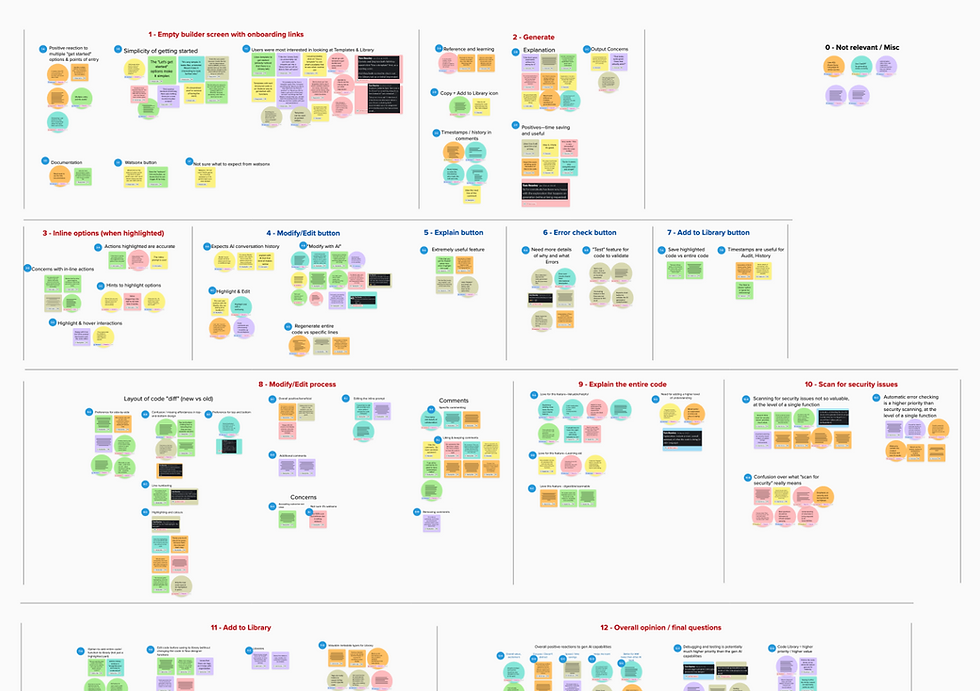
Research synthesis
-
Participants agreed the AI features would add clear value by improving learning and saving time. They also felt the new design made CELx easier to understand and less frustrating.
-
Embedded AI was strongly preferred over the external chat based panel, mainly because it improved discoverability, reduced the need to craft prompts, and supported task focus.
-
The code library stood out as a major need. Some participants viewed it as higher priority than AI assistance due to the absence of a central place for reusable CELx snippets.
I’m surprised in a positive way. Happy to see these new features being added. I hope the code library is the first to be delivered.
SCOTT
With these features Scott will:
Build confidence
Scott enters the CELx editor knowing AI support is available whenever he needs it.
Boost productivity
Quick actions make it possible to generate, explain, and fix code within minutes.
Learn on the job
Scott can ask questions and receive contextual guidance, improving his understanding of CELx as he works.
Safety first
With AI helping to ensure expressions are accurate and error‑free, Scott can trust the code he delivers.
Scott no longer approached CELx with stress,
he approached it with confidence.

CONCLUSION
9
Generative AI suggestions are important and useful, but the code library became a clear user priority.
One of the strongest insights from the research was that users wanted a stable and reliable code library where they could save, reuse and share code. This feature solved a real pain point. Even though we were asked by IBM to include generative AI, the research showed that the code library created more immediate value than an AI tool that generates code. At the same time, we also saw that AI can support the experience in helpful ways, especially for speeding up repetitive tasks and helping newer users get started. This helped us understand that the best approach is to combine both: deliver the core feature that users need, and add genAI in places where it genuinely improves the workflow.